首页产品文档APISaaS平台
首页
产品文档
收银台展示建议支付产品能力稳定币订阅支付自动货币转换
API
接入准备支付服务订阅服务退款服务Webhook 通知
SaaS平台
ShopifyWooCommerceShoplazzaSHOPYY
  • 支付产品能力
  • 自动货币转换
  • 收银台展示建议和 StablePay Logo
  • 稳定币订阅支付
首页/产品/订阅
StablePay 开发者文档
Home
Product
API
SaaS
Login
Register
GitHub
Home
Product
API
SaaS
Login
Register
GitHub
  • 产品介绍 / Product

    • 收银台展示建议 / Checkout Display Guide
    • 支付产品能力 / Payment Capabilities
    • 稳定币订阅支付 / Stablecoin Subscription
    • 自动货币转换 / Auto Conversion

StablePay Stablecoin Subscription 稳定币订阅支付

1. 什么是订阅(Subscription)

订阅用于管理客户的整套周期性扣费生命周期:创建订阅、完成首次钱包授权、按账期自动扣款、处理续费失败与重试,以及取消订阅。接入 StablePay Stablecoin Subscription,您的用户完成第一次链上钱包授权,您即可享受 USDC/USDT 自动续费,实现业务增长。

  • 灵活扣款周期(daily / weekly / monthly / yearly)
  • 首次 on-session 完成钱包授权(可同时完成首期支付)
  • 后续账期 off-session 自动续费扣款
  • 生命周期以 Webhook 为准驱动业务状态更新

Subscriptions manage the entire recurring billing lifecycle for your customers: creating subscriptions, completing initial wallet authorization, automatic billing per cycle, handling renewal failures and retries, and canceling subscriptions. By integrating StablePay Stablecoin Subscription, once your users complete their first on-chain wallet authorization, you can enjoy automatic USDC/USDT renewals to drive business growth.

  • Flexible billing cycles (daily / weekly / monthly / yearly)
  • First on-session wallet authorization (can complete first payment simultaneously)
  • Subsequent off-session automatic renewal billing
  • Lifecycle driven by Webhooks for business state updates

2. 订阅的扣费方式

自动扣款(钱包授权 → 保存支付方式 → 自动续费)

工作方式:

  1. 用户在 StablePay Hosted Checkout 完成链上钱包授权(并可能支付首期)
  2. StablePay 保存可复用的"授权/支付方式"(用于后续扣款)
  3. 后续每个账期自动生成账单,并在到期时 off-session 自动扣款

首次订阅流程:
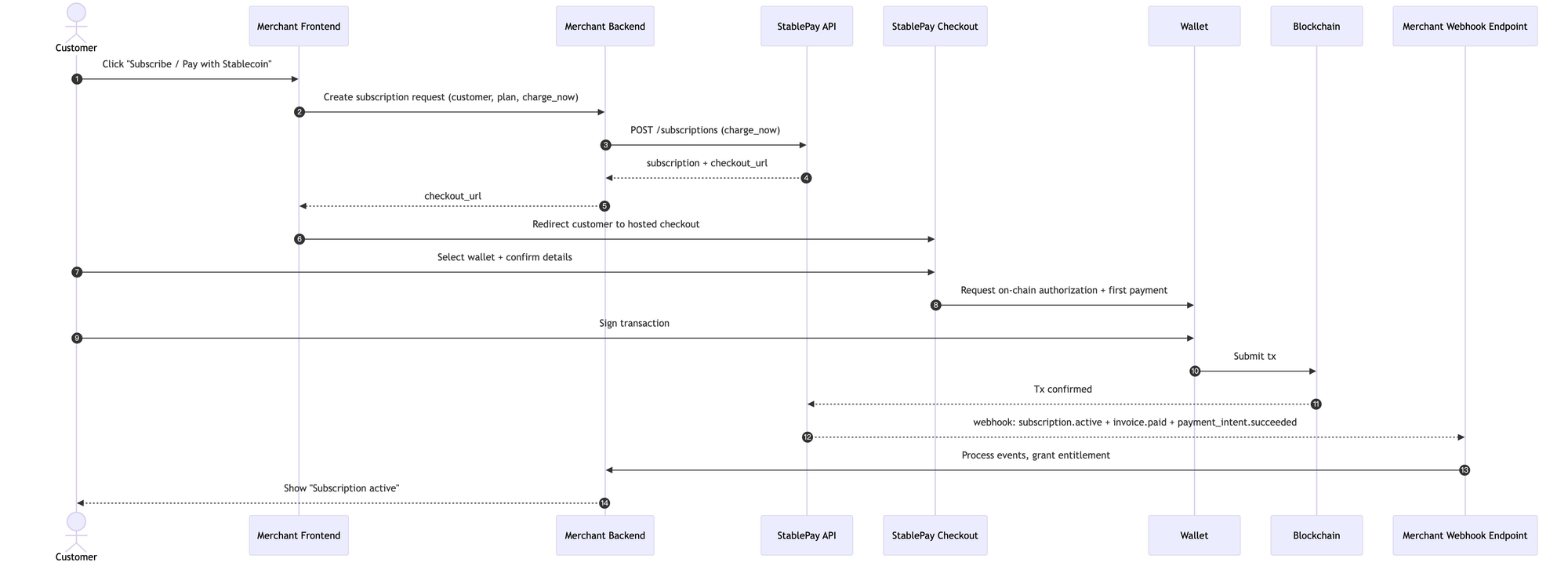
How it works:

  1. User completes on-chain wallet authorization on StablePay Hosted Checkout (and may pay the first installment)
  2. StablePay saves the reusable "authorization/payment method" (for subsequent billing)
  3. Each subsequent billing cycle automatically generates an invoice and charges off-session at due date

Initial Subscription Flow:

Subscription Flow

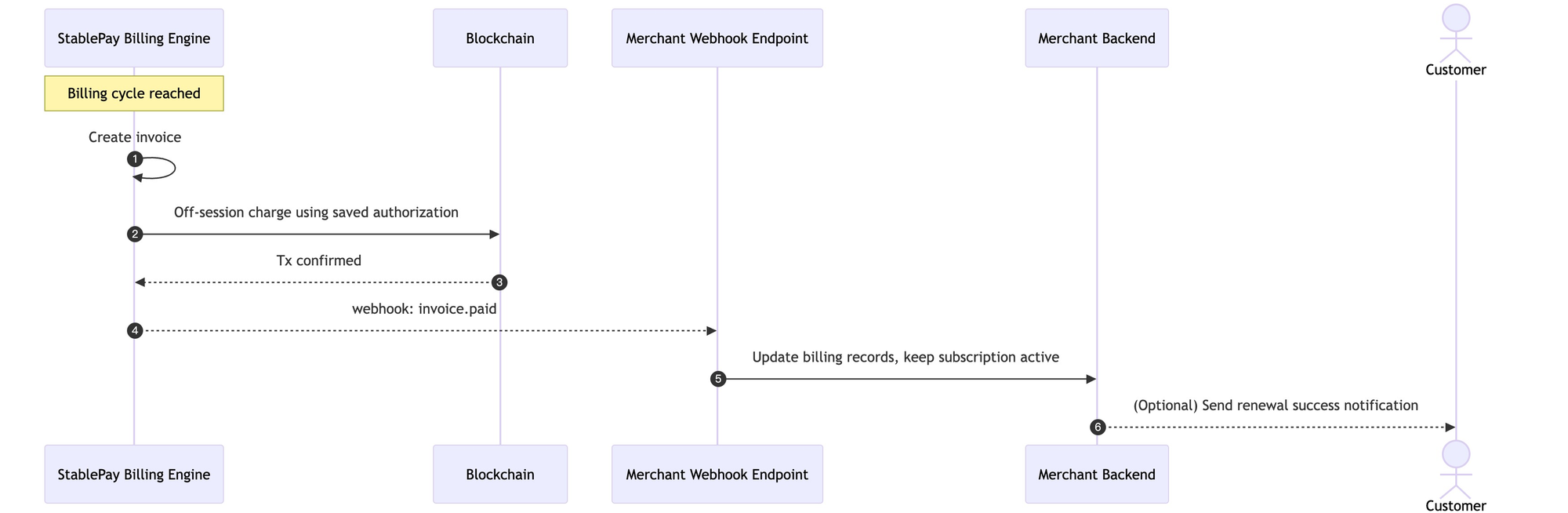
续费自动扣款流程:

Automatic Renewal Flow:

Renewal Flow

3. Dunning(续费失败恢复 / 自动重试)

续费失败后的自动恢复称为 Dunning;StablePay 内置默认重试策略。
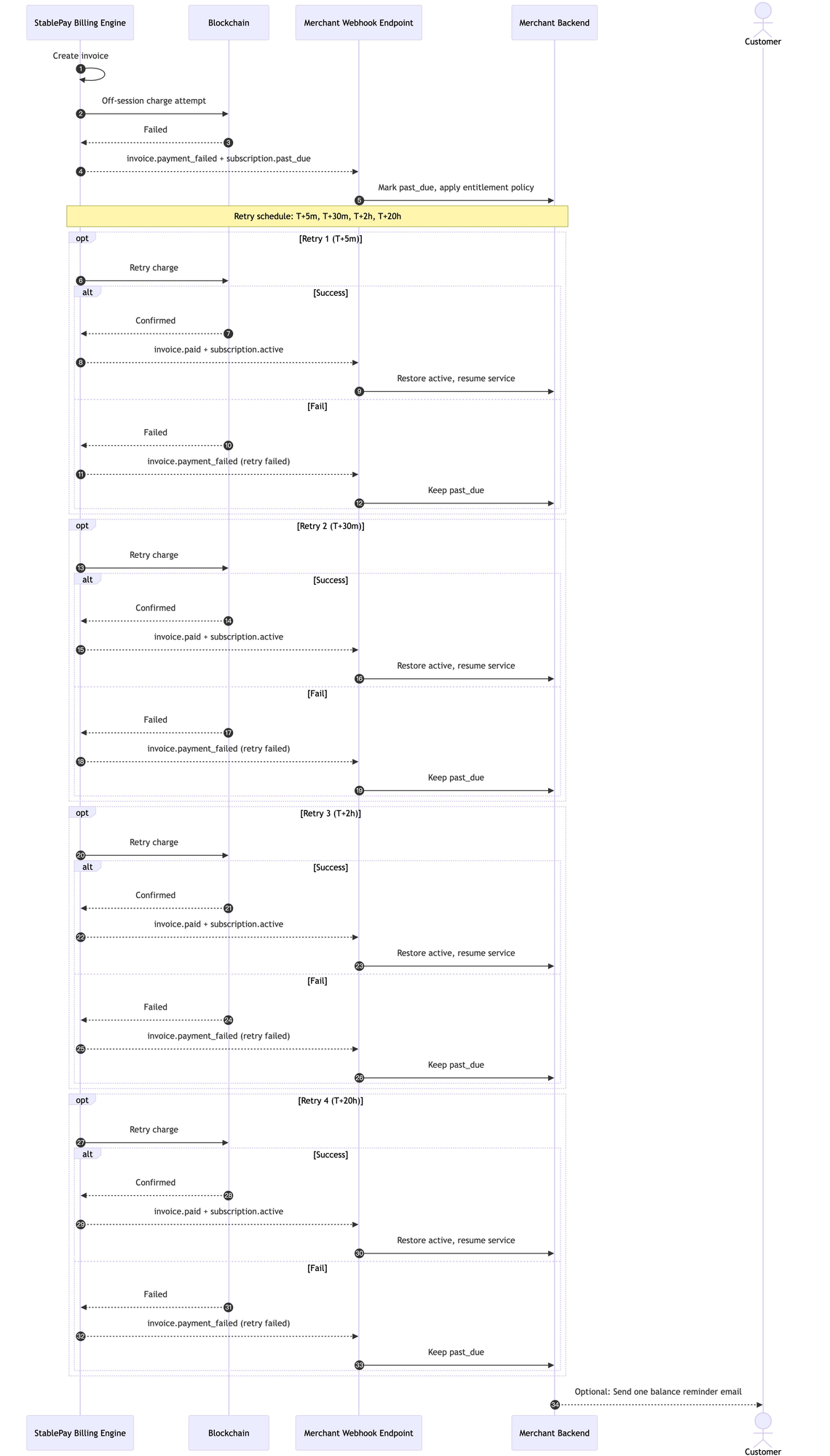
Automatic recovery after renewal failure is called Dunning; StablePay has a built-in default retry strategy.

Dunning Flow

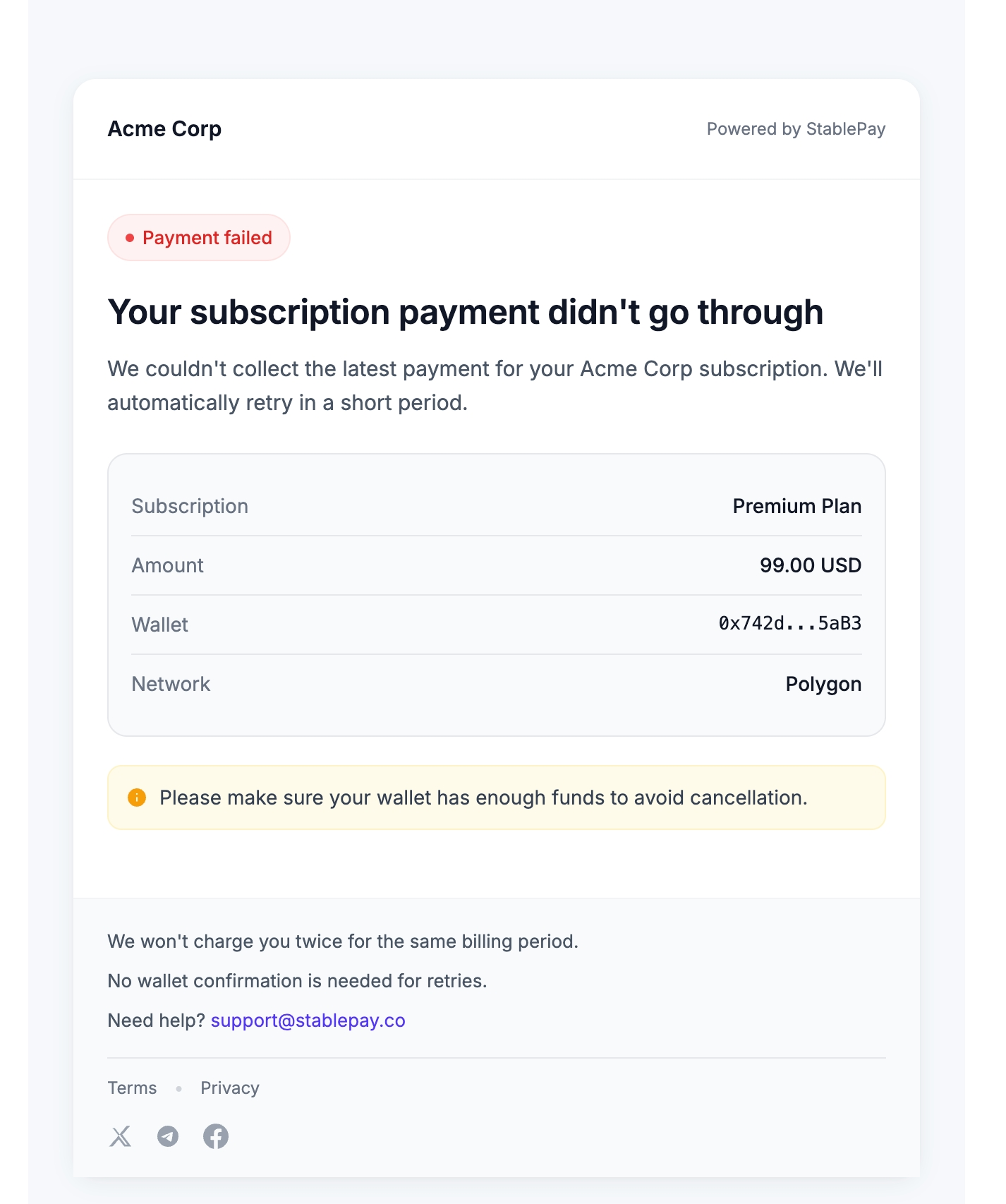
发送提醒邮件给用户:

Dunning 提醒邮件

状态变化与重试策略

当续费扣款失败:

  • 订阅状态进入 past_due
  • StablePay 默认自动重试 4 次
  • 重试节奏:+5 分钟、+30 分钟、+2 小时、+20 小时

重试成功:

  • 任意一次重试成功,订阅恢复为 active
  • 继续进入下一账期

重试耗尽:

  • 当重试全部失败,订阅自动变为 canceled(不再继续生成新账期)

Send reminder email to user:

Dunning Reminder Email

State Changes and Retry Strategy

When renewal billing fails:

  • Subscription status enters past_due
  • StablePay automatically retries 4 times by default
  • Retry schedule: +5 minutes, +30 minutes, +2 hours, +20 hours

Retry succeeds:

  • If any retry succeeds, subscription restores to active
  • Continues to the next billing cycle

Retries exhausted:

  • When all retries fail, subscription automatically becomes canceled (no new billing cycles generated)

4. 账单(Invoice)生成:账期如何运转

每个账期都会生成一张 Invoice(账单),表示该周期应收金额与支付结果。

StablePay 支持 3 种订阅启动模式(创建订阅时选择其一):

模式说明
立即开通 + 立即扣首期首张账单当场应收,用户在 checkout 完成支付
立即开通 + 首期延后扣用户当场只授权,首张应收账单在未来扣款日自动扣
Trial(试用)用户当场只授权,试用结束时生成首张应收账单并自动扣款

Each billing cycle generates an Invoice representing the amount due and payment result for that period.

StablePay supports 3 subscription start modes (choose one when creating a subscription):

ModeDescription
Activate + Charge NowFirst invoice is due immediately, user completes payment at checkout
Activate + Charge LaterUser only authorizes at checkout, first invoice is automatically charged on the future billing date
TrialUser only authorizes at checkout, first invoice is generated and automatically charged when trial ends

5. 立即开始

Step 0 — 注册 StablePay 账号

  • 立即注册
  • 联系商务和技术支持
  • Register Now
  • Contact Sales & Technical Support

Step 1 — 选择订阅启动模式

模式说明
立即扣首期用户在 checkout 完成授权并支付首期
首期延后扣用户仅完成授权,首期在未来账期自动扣款
试用 Trial用户仅完成授权,试用结束后自动扣款
ModeDescription
Charge NowUser completes authorization and first payment at checkout
Charge LaterUser only authorizes, first charge on future billing date
TrialUser only authorizes, auto-charge after trial ends

Step 2 — 创建订阅(API 服务端)

你为某个 customer + plan 创建订阅。StablePay 会返回 Hosted Checkout URL(用于首期授权/支付)。

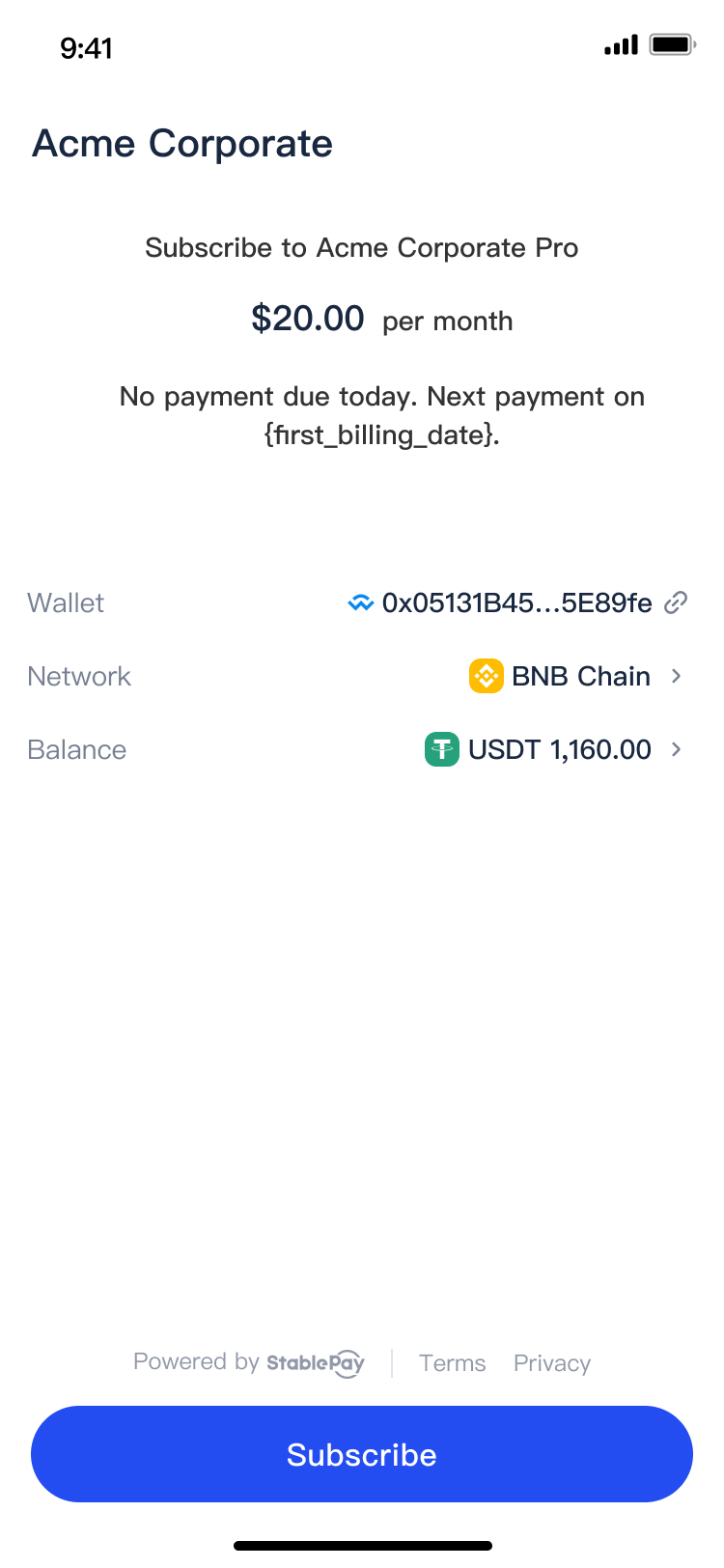
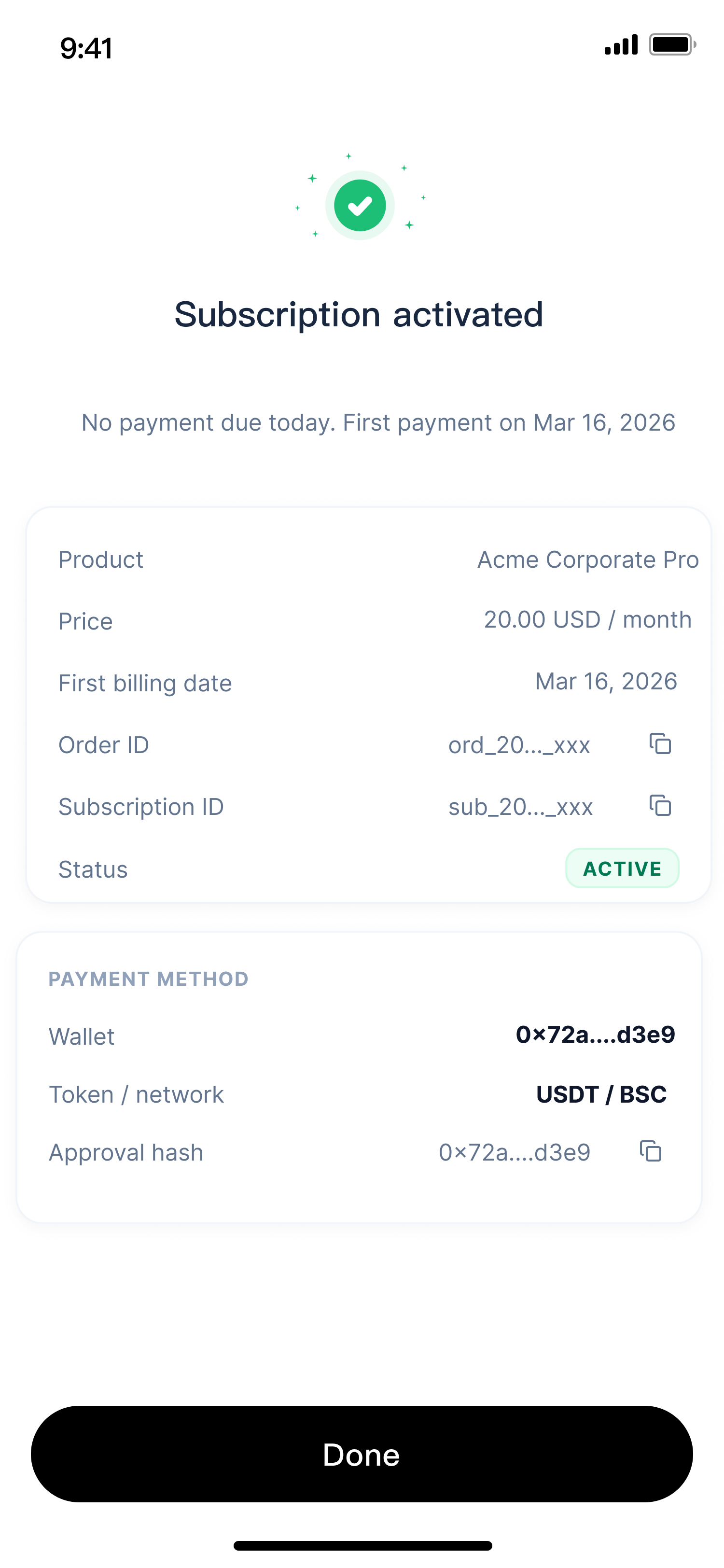
Hosted Checkout URL 打开如下图,StablePay 处理钱包授权和链上支付逻辑:
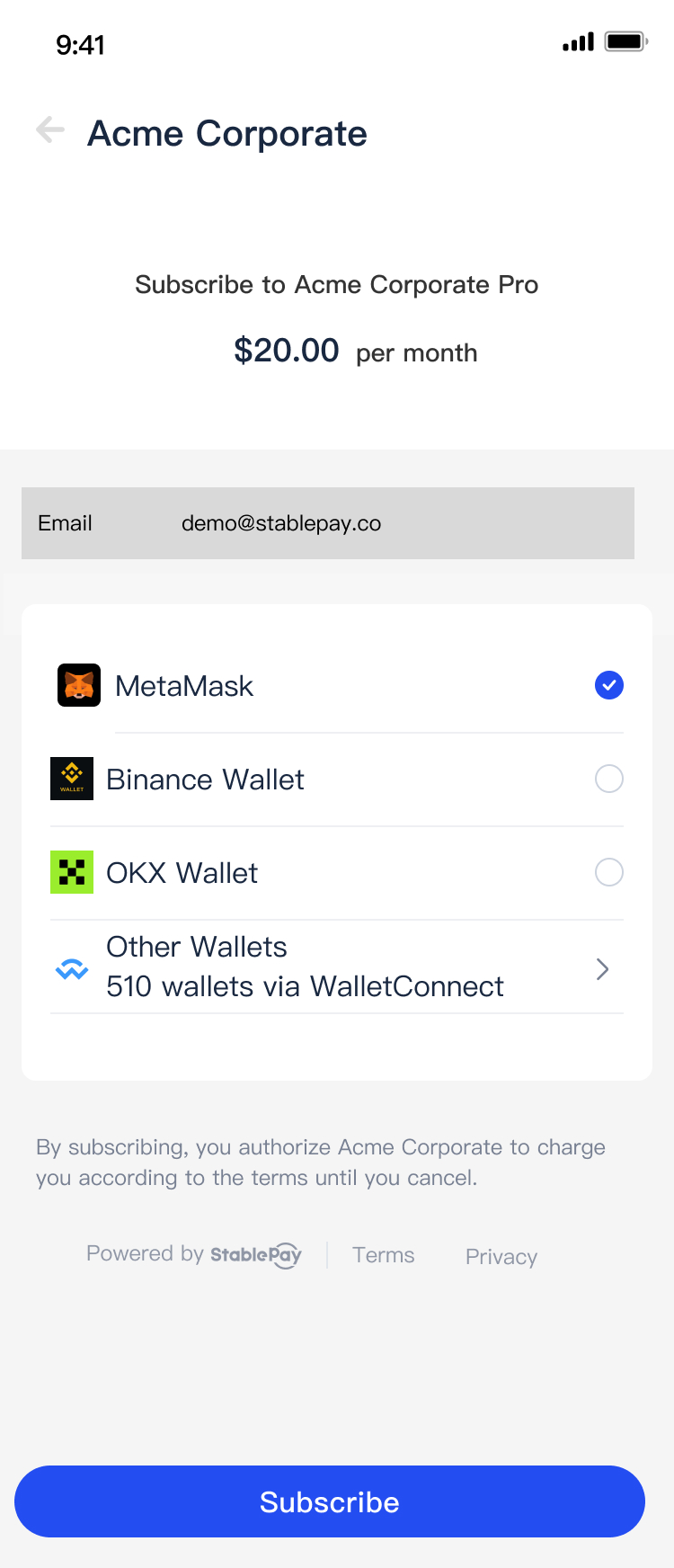
订阅支付页面

You create a subscription for a customer + plan. StablePay returns a Hosted Checkout URL (for initial authorization/payment).

The Hosted Checkout URL opens as shown below, StablePay handles wallet authorization and on-chain payment logic:

Subscription Checkout Page

Step 3 — 用户完成 Hosted Checkout(首期会话)

用户在 Hosted Checkout 内完成:

  1. 选择钱包
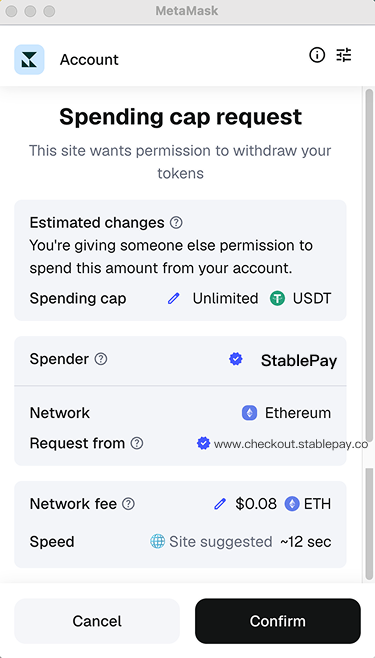
  2. 钱包授权签名
  3. 支付首期
WalletConnect 连接后支付确认延后扣-授权成功

User completes in Hosted Checkout:

  1. Select wallet
  2. Wallet authorization signature
  3. Pay first installment
WalletConnect ConnectedPayment ConfirmationCharge Later - Authorized

Step 4 — 用 Webhook 跟踪生命周期

你的系统应当以 Webhook 回调为"真实结果",据此开通/关闭权益、更新订单、发送通知等。

Your system should treat Webhook callbacks as the "source of truth" to grant/revoke entitlements, update orders, send notifications, etc.

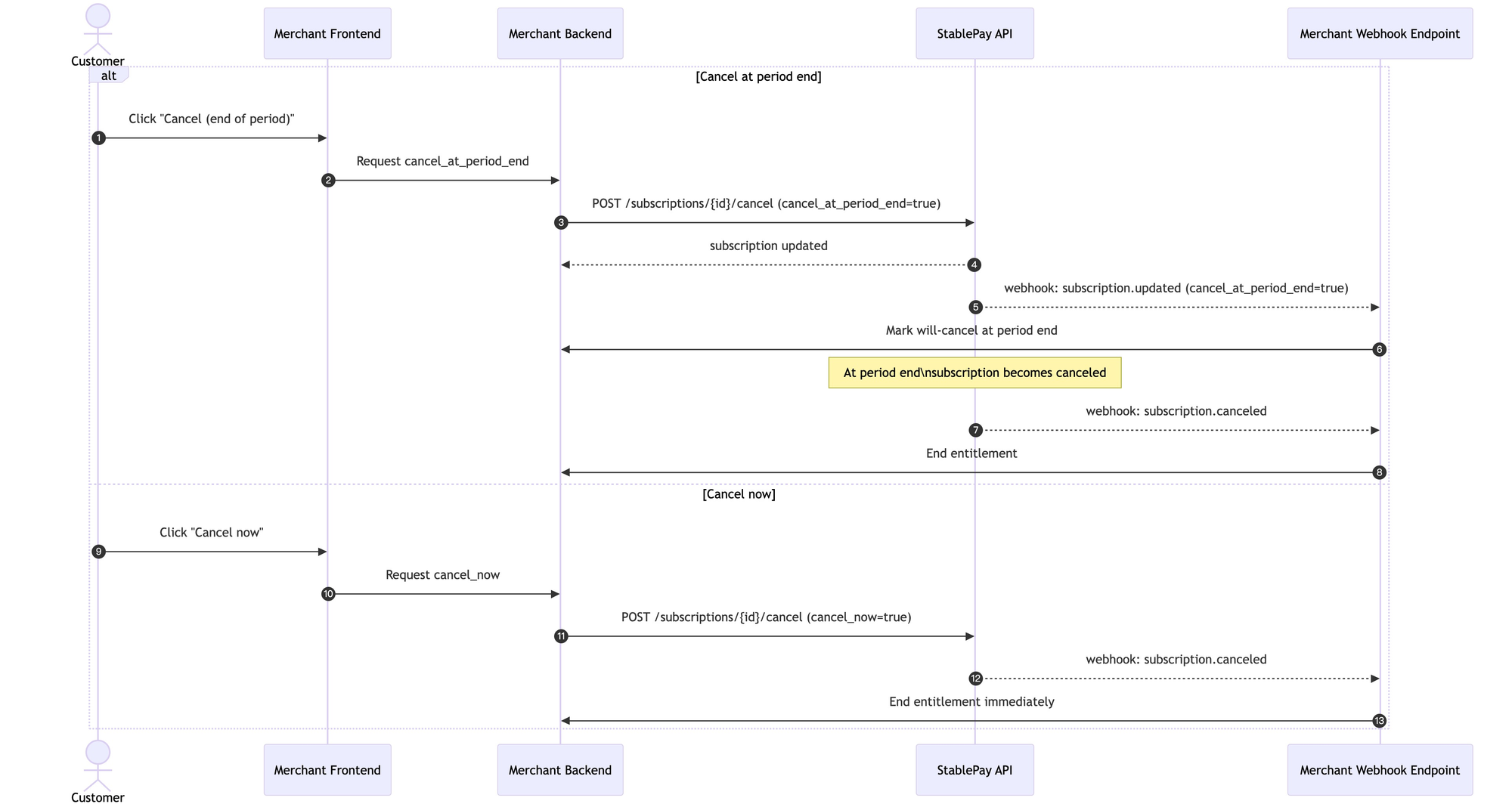
Step N — 取消订阅(到期取消 vs 立即取消)

取消指定订阅,可选择立即取消或账期结束时取消:

  • cancel_at_period_end = true:到期取消
  • cancel_at_period_end = false:立即取消

Cancel a subscription with the option to cancel immediately or at the end of the billing period:

  • cancel_at_period_end = true: Cancel at period end
  • cancel_at_period_end = false: Cancel immediately
Cancel Subscription Flow

6. 商户接入场景

场景 A:商户第一次上线订阅(没有存量用户)

推荐上线节奏:

  1. 先上"立即扣首期"验证转化、客服压力、对账链路
  2. Webhook 驱动激活稳定后再加 Trial
  3. 只有在需要"对齐账单日"时才上"首期延后扣"

Recommended launch sequence:

  1. Start with "Charge Now" to validate conversion, support workload, and reconciliation pipeline
  2. Add Trial after Webhook-driven activation is stable
  3. Only add "Charge Later" when you need to align billing dates

场景 B:商户已接卡订阅,希望新增稳定币订阅

推荐做法:并行提供支付方式

  • 保持原卡订阅不动
  • 新增"使用稳定币订阅(StablePay)"作为第二种选项
  • 让用户主动选择/切换

"切换支付方式"体验(避免重复扣款):

  1. 新建一个 StablePay 订阅
  2. 原卡订阅设置为"到期取消"(period end cancel),确保同一权益不会重复扣款

Recommended approach: Offer payment methods in parallel

  • Keep existing card subscriptions unchanged
  • Add "Subscribe with Stablecoin (StablePay)" as a second option
  • Let users actively choose/switch

"Switch payment method" experience (avoid double billing):

  1. Create a new StablePay subscription
  2. Set the original card subscription to "cancel at period end" to ensure no duplicate billing for the same entitlement

7. Webhooks

Subscription

事件说明
subscription.created触发时机:商户成功创建订阅后触发(订阅对象已生成)。

你应该做什么:
  • 在你系统里创建订阅记录(pending 状态),关联 customer、plan、subscription_id
  • 保存 checkout_url(如有)用于前端跳转
注意点:
  • 这个事件不代表用户已授权或已支付,通常后续还会有 trialing/active/incomplete_expired
subscription.trialing触发时机:用户完成首次授权,且该订阅配置了试用期,订阅进入试用中。

你应该做什么:
  • 立即开通试用权益(标记试用开始/结束时间)
  • 在用户页展示"试用中,到期将自动扣款"
注意点:
  • 试用结束会触发 invoice 生成并尝试扣款,结果会通过 invoice.paid 或 invoice.payment_failed 表达
subscription.active触发时机:订阅进入正常可续费状态,通常发生在:
  • 无 trial:用户完成首次授权(可能同时首期支付成功)
  • 有 trial:试用结束且首期扣款成功后
  • past_due 重试成功恢复后
你应该做什么:
  • 开通/恢复正式权益
  • 更新你系统订阅状态为 active
注意点:
  • "active"不一定意味着"本期一定已付款",是否已付款请以 invoice.paid 为准(尤其是 charge later / trial 的场景)
subscription.past_due触发时机:最近一期应收款扣款失败,订阅进入"逾期 + 正在重试"。

你应该做什么:
  • 标记订阅为 past_due(续费失败)
  • 按你的策略处理权益(继续可用/限制功能/宽限期提示)
  • 触发一次性提醒(邮件/站内信),引导用户补足余额/更换钱包
注意点:
  • 接下来你会持续收到 invoice.payment_failed(每次重试失败)或最终 invoice.paid(重试成功)
  • 重试耗尽可能会进入 subscription.canceled
subscription.canceled触发时机:订阅终止,不会再生成新的账期。常见原因:
  • 用户/商户主动取消(立即或到期取消生效时)
  • 续费失败重试耗尽被系统自动取消
你应该做什么:
  • 关闭权益或设置"到期失效"
  • 停止后续续费相关提醒
  • 提示用户重新订阅(如果业务需要)
注意点:
  • 若你们支持"到期取消",可能先收到 subscription.updated(标记 cancel_at_period_end),到期再收到 subscription.canceled
subscription.updated触发时机:当订阅对象的任意可变字段发生变化时触发。在 StablePay v1 中,最常见的触发场景是:商户调用 Cancel Subscription 并更新订阅的取消相关属性,例如:
  • 将 cancel_at_period_end 从 false 更新为 true(到期取消)
你应该做什么:
  • 同步更新你系统中的订阅取消状态(例如:标记"将于本期结束取消")
  • 在用户侧展示清晰的取消信息:"Your subscription will end on {current_period_end}"
  • 如果业务需要,可在收到 subscription.updated 时发送一次确认通知(避免等到真正 canceled 才告知用户)
注意点:
  • subscription.updated 不代表订阅已终止:真正终止应以 subscription.canceled 为准
  • 建议商户用 subscription.id + event_id 做幂等去重;并以 webhook payload 中的最新订阅对象为准(避免乱序造成状态回退)
subscription.incomplete_expired触发时机:订阅创建后,用户未在规定时间内完成首次授权(例如 30 分钟),订阅失效。

你应该做什么:
  • 标记订阅为 expired/failed_onboarding
  • 前端提示用户"会话已过期,请重新发起订阅"
  • 允许用户重新创建一个新的订阅并获取新的 checkout_url
注意点:
  • 这不是取消(canceled),而是"首次 setup 没完成导致过期"
EventDescription
subscription.createdWhen triggered: After merchant successfully creates a subscription (subscription object generated).

What you should do:
  • Create subscription record (pending status) in your system, link customer, plan, subscription_id
  • Save checkout_url (if any) for frontend redirect
Note:
  • This event does not mean user has authorized or paid; typically followed by trialing/active/incomplete_expired
subscription.trialingWhen triggered: User completed initial authorization with trial configured, subscription enters trial.

What you should do:
  • Grant trial entitlements immediately (mark trial start/end time)
  • Show "In trial, will auto-charge at expiry" on user page
Note:
  • Trial end triggers invoice generation and charge attempt, result expressed via invoice.paid or invoice.payment_failed
subscription.activeWhen triggered: Subscription enters normal renewable state. Typically occurs when:
  • No trial: user completes first auth (possibly with first payment)
  • With trial: trial ends with successful first charge
  • past_due retry succeeds
What you should do:
  • Grant/restore full entitlements
  • Update subscription status to active
Note:
  • "active" doesn't necessarily mean "current period is paid" — check invoice.paid for payment confirmation (especially for charge later / trial scenarios)
subscription.past_dueWhen triggered: Latest billing charge failed, subscription enters "overdue + retrying".

What you should do:
  • Mark subscription as past_due
  • Apply entitlement policy (continue/restrict/grace period)
  • Trigger one-time reminder (email/in-app) to guide user to top up balance/switch wallet
Note:
  • You'll continue receiving invoice.payment_failed (each retry failure) or eventually invoice.paid (retry success)
  • Retries exhausted may lead to subscription.canceled
subscription.canceledWhen triggered: Subscription terminated, no new billing cycles. Common reasons:
  • User/merchant cancellation (immediate or at period end)
  • Retry exhaustion auto-cancel
What you should do:
  • Revoke entitlements or set "expire at period end"
  • Stop renewal reminders
  • Prompt user to resubscribe if needed
Note:
  • If you support "cancel at period end", you may first receive subscription.updated (marking cancel_at_period_end), then subscription.canceled at period end
subscription.updatedWhen triggered: When any mutable field of the subscription object changes. In StablePay v1, the most common scenario is: merchant calls Cancel Subscription and updates cancellation attributes, e.g.:
  • Setting cancel_at_period_end from false to true
What you should do:
  • Sync cancellation status in your system (e.g., mark "will cancel at period end")
  • Show clear cancellation info: "Your subscription will end on {current_period_end}"
  • Optionally send confirmation notification (don't wait until actual canceled to inform user)
Note:
  • subscription.updated does not mean subscription is terminated — use subscription.canceled as the definitive signal
  • Use subscription.id + event_id for idempotent deduplication, and trust the latest subscription object in webhook payload (avoid state rollback from out-of-order events)
subscription.incomplete_expiredWhen triggered: After subscription creation, user didn't complete initial authorization within time limit (e.g., 30 min), subscription expires.

What you should do:
  • Mark subscription as expired/failed_onboarding
  • Show "Session expired, please create a new subscription"
  • Allow user to create new subscription with new checkout_url
Note:
  • This is not a cancellation (canceled), but "first setup didn't complete, causing expiry"

Invoice

事件说明
invoice.created触发时机:生成一张新的账单(可能是首期,也可能是续费周期)。

你应该做什么:
  • 记录 invoice_id、金额、币种、账期区间(period start/end)
  • 在账单/订阅详情页展示"本期应收"
注意点:
  • 对于 trial 订阅,通常在 trial end 才会创建首张应收 invoice
  • 对于 charge later,可能在未来 billing anchor 才创建首张 invoice
invoice.paid触发时机:账单支付成功(首期或续费)。

你应该做什么:
  • 将 invoice 标记为 paid
  • 延长/确认用户权益到新的 period_end
  • 发送"续费成功/付款成功"通知(可选)
注意点:
  • 这是"钱确实收到了"的最权威信号之一(比 subscription.active 更直接)
invoice.payment_failed触发时机:账单支付失败(首期/续费扣款失败,或重试失败)。

你应该做什么:
  • 将 invoice 标记为 failed(或 last_attempt_failed)
  • 如果订阅进入 past_due,展示"待支付/重试中"状态
  • 触发一次性提醒(不要每次重试都骚扰用户)
注意点:
  • 后续可能再次触发 invoice.payment_failed(每次重试)
  • 成功后会触发 invoice.paid;若最终失败并取消,会触发 subscription.canceled
EventDescription
invoice.createdWhen triggered: A new invoice is generated (first period or renewal cycle).

What you should do:
  • Record invoice_id, amount, currency, period range (period start/end)
  • Display "Amount due this period" on billing/subscription detail page
Note:
  • For trial subscriptions, first receivable invoice is typically created at trial end
  • For charge later, first invoice may be created at future billing anchor
invoice.paidWhen triggered: Invoice payment succeeded (first period or renewal).

What you should do:
  • Mark invoice as paid
  • Extend/confirm user entitlements to new period_end
  • Send "renewal success/payment success" notification (optional)
Note:
  • This is one of the most authoritative signals that payment was received (more direct than subscription.active)
invoice.payment_failedWhen triggered: Invoice payment failed (first/renewal charge failure, or retry failure).

What you should do:
  • Mark invoice as failed (or last_attempt_failed)
  • If subscription enters past_due, show "pending/retrying" status
  • Trigger one-time reminder (don't spam user on every retry)
Note:
  • May be triggered again for each retry
  • invoice.paid on success; if all retries fail and subscription cancels, subscription.canceled will be triggered

Refund

事件说明
refund.created触发时机:创建了一笔新的退款请求/退款记录(已进入处理流程)。

你应该做什么:
  • 在你系统中创建 refund 记录(refund_id、关联 invoice/payment、金额、原因)
  • 将对应订单/账单状态更新为"退款处理中"
注意点:
  • created 不代表一定会成功,最终结果看 succeeded/failed
refund.succeeded触发时机:退款成功完成(资金已退回/链上退款完成/出账完成)。

你应该做什么:
  • 将 refund 标记为 succeeded
  • 将对应订单/账单标记为 refunded(全退/部分退)
  • 通知用户退款成功(可选)
注意点:
  • 部分退款建议在文案里提示"部分金额已退回"(若支持 partial)
refund.failed触发时机:退款处理失败(例如链上失败、风控/合规原因、通道失败等)。

你应该做什么:
  • 将 refund 标记为 failed
  • 恢复或保持原订单/账单状态(取决于退款语义)
  • 提示用户联系客服或稍后重试(可选)
注意点:
  • 建议在 payload 里包含失败原因码,商户可用于客服排查
EventDescription
refund.createdWhen triggered: A new refund request/record was created (entered processing pipeline).

What you should do:
  • Create refund record in your system (refund_id, linked invoice/payment, amount, reason)
  • Update corresponding order/invoice status to "refund processing"
Note:
  • "created" doesn't guarantee success — final result depends on succeeded/failed
refund.succeededWhen triggered: Refund completed successfully (funds returned/on-chain refund complete/disbursement complete).

What you should do:
  • Mark refund as succeeded
  • Mark corresponding order/invoice as refunded (full/partial)
  • Notify user of successful refund (optional)
Note:
  • For partial refunds, recommend showing "Partial amount has been refunded" in copy (if partial is supported)
refund.failedWhen triggered: Refund processing failed (e.g., on-chain failure, risk/compliance reasons, channel failure, etc.).

What you should do:
  • Mark refund as failed
  • Restore or maintain original order/invoice status (depends on refund semantics)
  • Prompt user to contact support or retry later (optional)
Note:
  • Recommend including failure reason code in payload for merchant support investigation

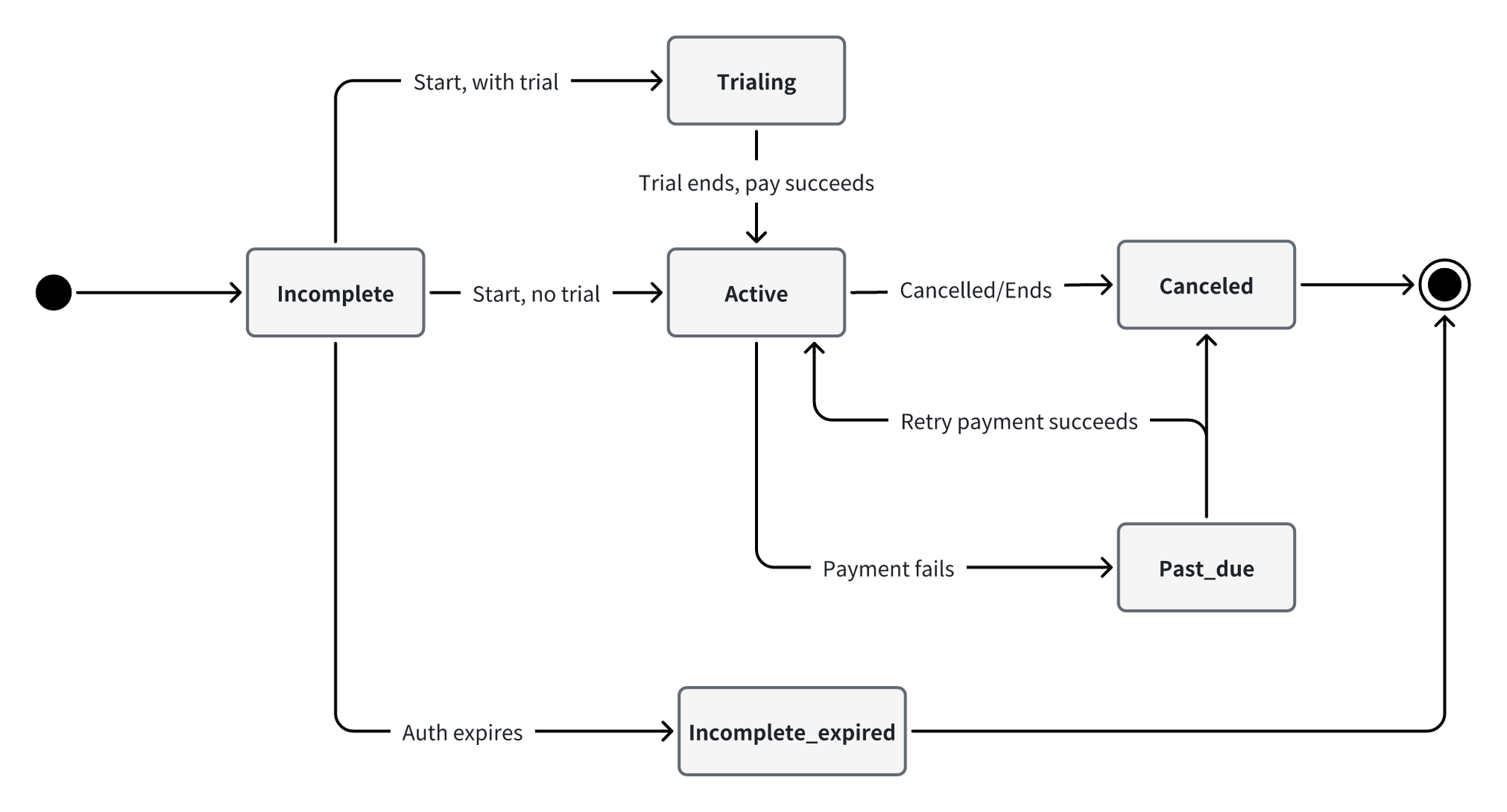
8. 订阅状态机

Subscription State Machine

关键规则:

  • Incomplete → Incomplete_expired:首期授权超过 30 分钟未完成
  • Active → Past_due:续费扣款失败
  • Past_due → Active:重试成功
  • Past_due → Canceled:重试耗尽自动取消
  • Active / Trialing / Past_due → Canceled:商户或用户取消(立即/到期)
状态说明
incomplete含义:是订阅的一种临时状态,表示订阅已创建但首次付款尚未成功。在这个状态下,订阅实际上还未开始提供服务。
处理:商家需将 checkout url 打开,用户在 StablePay checkout 完成首次钱包授权或支付。
incomplete_expired含义:创建订阅后 30 分钟内未完成授权即进入该状态(终态)
特点:不会再自动尝试付款
处理:需要创建新的订阅
注意:此状态的订阅无法重新激活
trialing含义:处于免费试用期
特点:不收费,trial_end 指示试用结束时间
转换:试用结束时自动尝试首次付款,成功则变为 active
active含义:订阅正常运行中
触发:成功支付、免费订阅创建、异步支付成功
特点:客户可以正常使用服务
注意:大多数健康订阅都在此状态
past_due含义:续费付款失败
特点:订阅依然有效,处于尝试重试扣款阶段
处理:按重试规则自动尝试再次付款
转换:可能转为 canceled 或保持 past_due
canceled含义:订阅已被终止
触发:主动取消、付款失败多次
特点:不再生成新的账单
注意:被取消的订阅无法重新激活,需创建新订阅

Key rules:

  • Incomplete → Incomplete_expired: Initial authorization not completed within 30 minutes
  • Active → Past_due: Renewal billing failed
  • Past_due → Active: Retry succeeded
  • Past_due → Canceled: Retries exhausted, auto-canceled
  • Active / Trialing / Past_due → Canceled: Merchant or user cancellation (immediate/at period end)
StatusDescription
incompleteMeaning: A temporary subscription state indicating the subscription has been created but the first payment has not yet succeeded. The subscription has not actually started providing service.
Action: Merchant should open the checkout URL for the user to complete initial wallet authorization or payment on StablePay checkout.
incomplete_expiredMeaning: Authorization was not completed within 30 minutes of subscription creation (terminal state)
Characteristics: No further automatic payment attempts
Action: A new subscription must be created
Note: Subscriptions in this state cannot be reactivated
trialingMeaning: In free trial period
Characteristics: No charges, trial_end indicates when trial ends
Transition: Automatically attempts first payment at trial end, becomes active on success
activeMeaning: Subscription is running normally
Triggers: Successful payment, free subscription creation, async payment success
Characteristics: Customer can use the service normally
Note: Most healthy subscriptions are in this state
past_dueMeaning: Renewal payment failed
Characteristics: Subscription is still valid, in retry billing phase
Action: Automatic retry according to retry rules
Transition: May transition to canceled or remain past_due
canceledMeaning: Subscription has been terminated
Triggers: Manual cancellation, multiple payment failures
Characteristics: No new invoices will be generated
Note: Canceled subscriptions cannot be reactivated, a new subscription must be created

9. 支付方式、钱包、币种和网络

支付方式

产品MetaMaskBinance WalletOKX WalletWalletConnect (510+ 钱包)
Subscription✅✅✅✅
ProductMetaMaskBinance WalletOKX WalletWalletConnect (510+ wallets)
Subscription✅✅✅✅

币种

仅支持创建 USD 订阅。

Only USD subscriptions are supported.

区块链网络

产品EthereumBinance Smart ChainSolana
Subscription✅✅✅
ProductEthereumBinance Smart ChainSolana
Subscription✅✅✅

10. 立即接入

  • 立即注册
  • 获取商务和技术支持
  • Register Now
  • Get Sales & Technical Support

11. API 列表

  • 订阅服务 API
  • Subscription API
最后更新 / Last Updated: 2026/3/31 16:57
Prev
支付产品能力 / Payment Capabilities
Next
自动货币转换 / Auto Conversion